Battlesmiths: Craft World merges medieval RPG action with deep strategic crafting and squad-building. The game features intricate systems for forging, customization, combat, and unit management, all combining to create a rich and engaging experience. Whether you're crafting legendary gear, competing in PvP, or exploring mysterious labyrinths, playing on PC via BlueStacks delivers sharper graphics, more precise controls, and smoother overall performance.
This guide will walk you through installing and enjoying the game on your desktop. Let's get started!
Installing Battlesmiths: Craft World on PC
Visit the game's page and click the "Play Battlesmiths: Craft World on PC" button. Install and launch BlueStacks. Sign into the Google Play Store and install the game. You're ready to play!
For Those Who Already Have BlueStacks Installed
Launch BlueStacks on your PC. Search for Battlesmiths: Craft World using the homescreen search bar. Click on the correct search result. Install the game and begin your adventure.
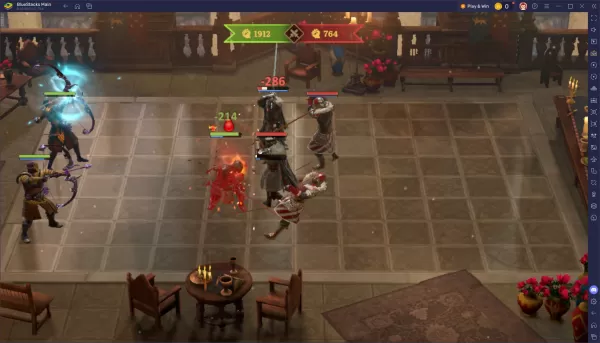
Battlesmiths: Craft World is a deep and strategic game that becomes even more immersive on a PC. BlueStacks provides the perfect platform to enhance your gameplay—from forging the ultimate artifact to leading your heroes in grand battles. Download BlueStacks, install the game, and start building your legacy on the big screen today!

 LATEST ARTICLES