After a brief delay to complete the Outlaw Keycard Community Quest, Story Quests are back in *Fortnite* Chapter 6, Season 2. However, they’re no walk in the park this time, particularly when it comes to Stage 4. Here's your guide on how to equip the Sensor Backpack and scan Mysterious Energy Signatures in *Fortnite*.
How To Find the Sensor Backpack in Fortnite
Stage 3 of the Wanted: Midas Quests requires you to open an Outlaw Chest, which demands reaching Rare rarity with the Outlaw Keycard. This task might take you a couple of hours as you rob vaults, take down guards, and spend your weight in gold. Once you manage to open that chest, Stage 4 awaits, and it's no easy feat.
*Fortnite* sends you on a quest for the "Sensor Backpack," an item you won't find in Chests or lying around. Instead, it's sitting on the ground behind the wolf statue south of Crime City—the same spot where you can join the Secret Wolf Pack. If you've been there before, you'll know the area well. When you get there, you'll see a case on the ground. Interact with it, and the Sensor Backpack will replace your Back Bling.
Related: How To Unlock the Dupli-Kate Skin in Fortnite
How To Scan Mysterious Energy Signatures in Fortnite Chapter 6
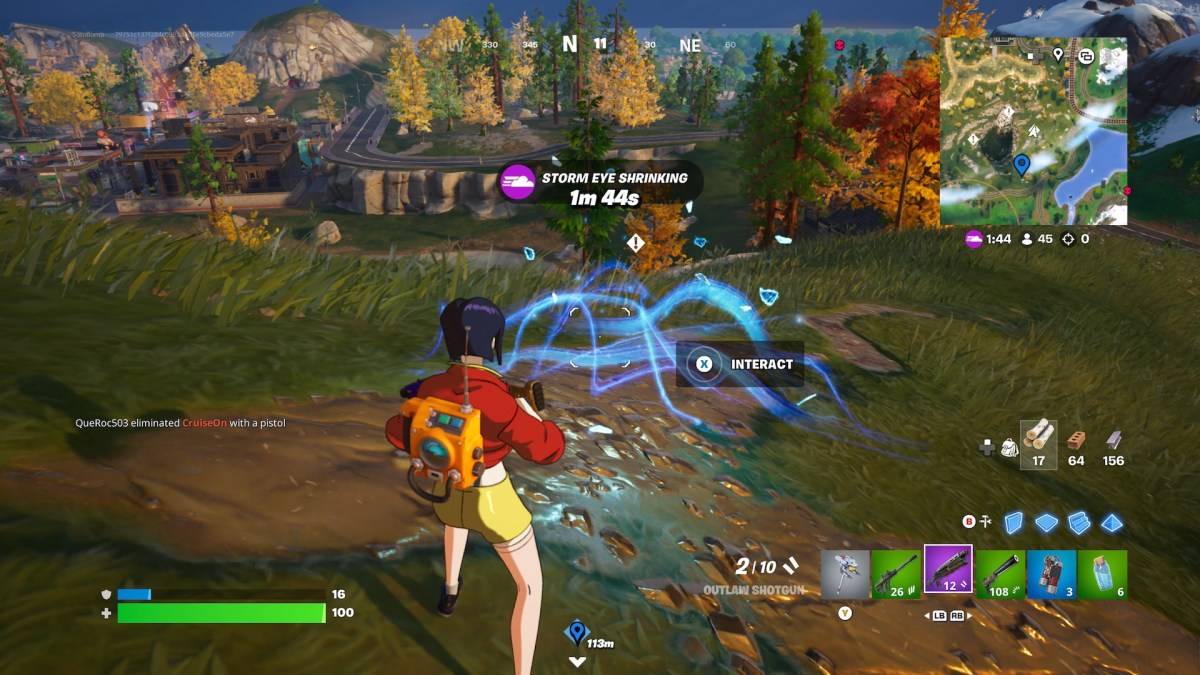 With the Sensor Backpack equipped, you're ready to hunt down the Mysterious Energy Signatures in *Fortnite*. There are three of them, conveniently located near where you found the backpack. Head up the mountain, and you'll spot three areas marked with exclamation points. When you reach the nearest one, glowing strings of light will appear, and all you need to do is interact with them.
The signatures are close to each other, but you must interact with all three to complete the Sensor Backpack Quest and earn your XP. Keep your wits about you, as other players will be completing their Outlaw Quests and may not hesitate to send you back to the lobby. It's wise to gear up before heading to the mountain to be prepared for any encounters.
Once you've completed the Sensor Backpack challenge, you can move on to Stage 5, which involves stealing a copy of the Mask-Making Book from the Mask Maker's Hideout. If you manage your time well, you might even complete this in the same game, especially with a vehicle at your disposal.
And that's how you equip the Sensor Backpack and scan Mysterious Energy Signatures in *Fortnite* Chapter 6.
*Fortnite is available to play on various platforms, including the Meta Quest 2 and 3.*

 LATEST ARTICLES