Subtitles are a widely appreciated accessibility feature, yet they're not for everyone. If you're playing *Avowed* and want to adjust your subtitle settings, here's a straightforward guide on how to turn subtitles on or off.
How to Turn Subtitles On & Off in Avowed
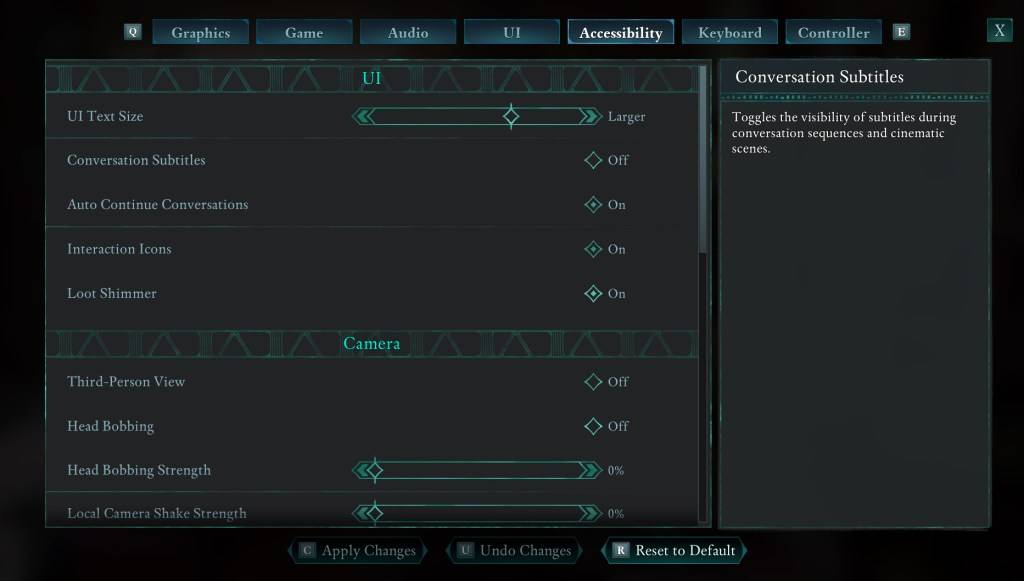
When you start *Avowed*, you'll encounter initial options for subtitles. If you accidentally choose something you didn't intend, don't worry—there are two convenient places within the game where you can adjust these settings.
Navigate to the "Settings" menu and select either the "UI" or "Accessibility" tab. Here, you'll find options for "Conversation Subtitles" and "Chatter Subtitles." Adjust these to your liking. For the most straightforward experience, the "Accessibility" tab is recommended, but feel free to use whichever you prefer.
Why Don’t Some People Like Subtitles?
While I personally rely on subtitles due to hearing needs, many players find them distracting during gameplay or media consumption. Preferences vary, so if subtitles enhance your experience, keep them on. If they don't, you have the freedom to turn them off.
What Are Avowed’s Accessibility Options Like?
*Avowed* offers a range of standard accessibility options, though they may not be as extensive as some other games. You can customize subtitles to improve readability by adjusting their size, background opacity, and the duration they remain on screen.
Beyond subtitles, *Avowed* includes features to help reduce motion sickness, such as minimizing camera shake and head bobbing. Additional accessibility options allow for adjustments like increased aim assist, toggling crouch and sprint modes, and other settings that enhance playability for a broader audience.
And that's how you can manage subtitles in *Avowed*.
*Avowed is available now.*

 LATEST ARTICLES